Showing posts with label No Flutter. Show all posts

Wednesday, August 14, 2013

Wonderland

 photo wonderland.png
This tutorial was written by me and for those
who have a good working knowledge of psp.


Supplies Needed

Tube
FTU artwork by ©No Flutter.
Tubes I used HERE

Font
cinnamon cake

Scrap


Mask
 Grungi 10 by Sharon at Creative Misfits

Text


Okay, let's get started.
Remember to save often!!!


Re-size elements as desired

Paste bg paper
Apply mask
Merge group

Paste tube and center

Paste elements of choice

I used 
hat
pocket watch
small door
teacup 1 and 2
tree 2
sparkles


Paste text and place where you like

Add name

Add copyright info

Crop & Save


Monday, October 29, 2012

Inspiration


This tutorial was written by me and for those
who have a good working knowledge of psp.


Supplies Needed


Tube of choice, I used FTU artwork by ©No Flutter.
Tubes I used HERE
Scrap kit, I used (FTU) PMTWS Inspiration Blog Train
Font of choice, I used Silverstein.
Mask, I used #364 from Weescotslass Creations.
 Optional Filter, I used Lokas Software - Gel.


Let's Begin! 

Open  new canvas 800 x 700.

We will be using bits from all 5 kits on blog train.

Schnegge’s  Scraps - paper 5, word art
Skulliez Skrapz - paper 5
Pimp’D Designs - word art 2
Designs by Sarah - arrow 2, frame 1, frame 3, paper 7
Alika Scraps - as02, as07, as13

Use my tag as a guide for placement.

Paste frame 1 and 3.
Click inside each one using magic wand
and expand by 10.
Invert.
Paste paper.
Hit delete.

Paste as07.

Paste paper 7.
Apply mask.
Merge Group.

Paste word art and place where you like it.

Paste arrow and star.

Paste tubes I supplied and move below frames.
Crop if needed.

Add name.

Highlight each letter of name 
 (one at a time) and change color in materials pallet for each one.
Apply gel effects if desired.

Add copyright info.

Save.


Sunday, July 19, 2009

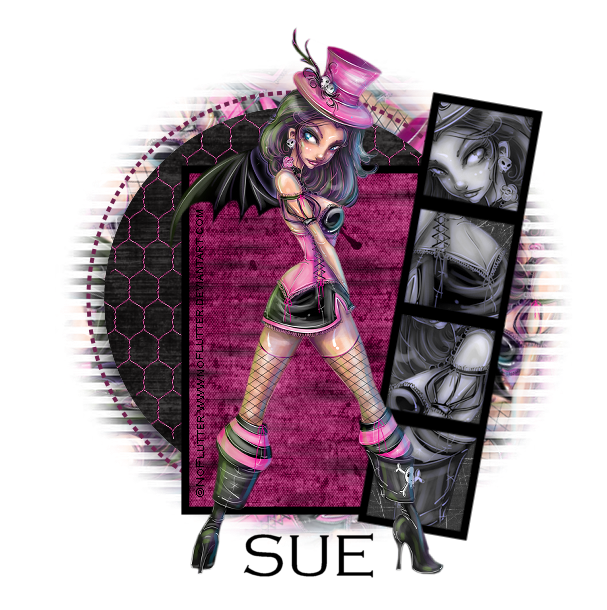
No Flutter Grunged


Photobucket


This tutorial is written for those that
have a working knowledge of PSP.


You will need...


Tube

 FTU artwork by ©No Flutter.
The one I used is HERE
Template

I used Template # 9 from Yvette
You can get this HERE.

Font

Copperplate Gothic


Filters Used

Mura's Meisters - Copies
Xero - Porcelain
You can get it HERE.

You will also need a pattern and mask of choice and wire mesh element


Okay, let's get started.

Remember to save often!!!

Open template and shift D and close original.
Go to image / canvas size / 700 x 700
Delete flower layer and copyright layer.

Click White BG Layer / Paste Tube
Mura's Meisters - Copies
Wall Paper - Rotate
Change Number to 35

Apply Mask
Merge Group

Select Circle Layer / Float / Smooth by 10
Flood Fill with Color
I used black
Select NonePaste wire element if desired
and fit it over circle.

Crop excess

Select Rectangle Layer / Float / Fill with Pattern
Select None

Select Frame / Float / Smooth by 10
Flood Fill with Color
I used Black.
Select None

Select Frame of Blocks and Dot Circle
and do same as above.
Select None

Select in Each Square
with Magic Wand
Invert

Paste Tube and Hit Delete
when you have each square filled
the way you like.


Select None

Xero - Porcelain
Default
I colorized using both at 0

Paste Tube
Add Name

Add Copyright.

Save as desired.

Hope you enjoyed my tutorial.